
How to Set Up Facebook Dynamic Ads to Gain More Conversions
Under Google’s 2026 Helpful Content guidelines, actionable paid media guides must deliver real, practical value instead of generic fluff. Setting up Facebook Dynamic Ads requires a structured approach to technical integration, catalog management, and audience intent—ensuring every marketing dollar actively drives measurable business growth rather than wasted ad impressions.
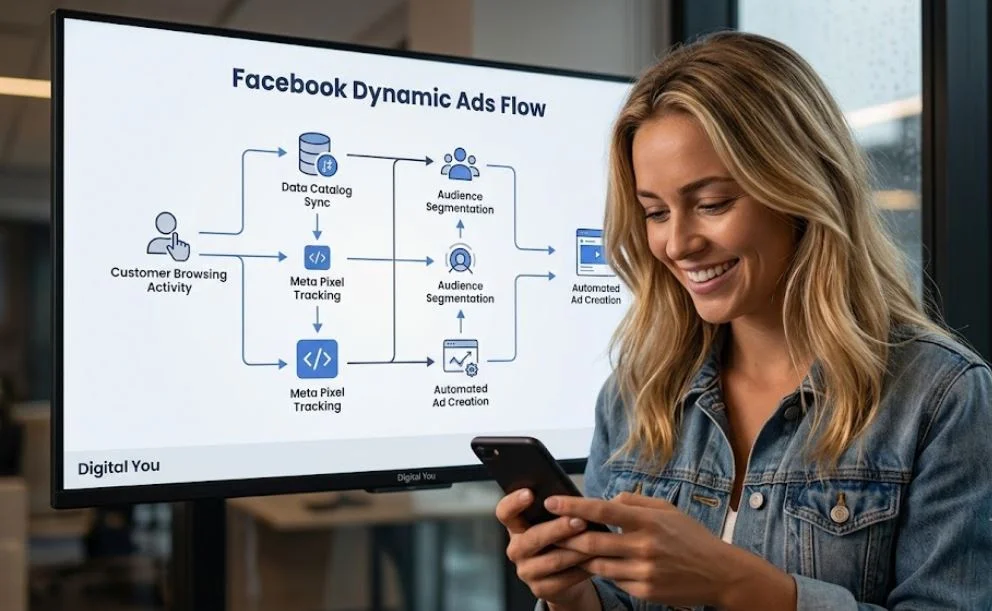
Why Facebook Dynamic Ads Are Essential for Modern E-Commerce Growth
Running static ads across a growing product catalog quickly becomes unsustainable. Facebook Dynamic Ads (now part of Meta Advantage+ catalog ads) solve this challenge by automatically serving tailored creative to users based on their exact interactions—such as viewing a specific item, adding a product to their cart, or browsing a complementary category.
From a behavioral psychology perspective, dynamic ads capitalize on cognitive fluency and recency bias. When a prospective buyer sees the exact product they were considering earlier in the day, the brain processes the visual cue effortlessly. This familiar interaction reduces decision friction and re-engages buyers during peak intent moments. Instead of overwhelming your audience with generic promotional banners, dynamic ads deliver personalized product recommendations that feel relevant and timely.
Businesses scaling online sales rely on structured frameworks to manage high-volume dynamic campaigns. Connecting your media strategy with end-to-end growth solutions—such as those explored across the core Digital You platforms—helps bridge the gap between creative execution and backend technical tracking.
Aligning Ad Strategy with Google’s Quality Standards
“Creating helpful, reliable, people-first content means delivering actionable clarity that directly answers the user’s intent without misleading or unnecessary complexity.” — Google Search Central Guidelines
Technical Prerequisites Before Launching Dynamic Ads
Before building your campaign in Meta Ads Manager, you need three core technical foundational elements in place. Skipping these steps leads to broken tracking and inaccurate reporting.
1. The Meta Pixel & Conversions API (CAPI)
Your tracking setup measures user activity on your website. To ensure clean data flow:
-
Install the Meta Pixel on all website pages.
-
Enable server-side tracking via the Conversions API (CAPI) to bypass browser cookie restrictions.
-
Configure key event parameters:
ViewContent,AddToCart,InitiateCheckout, andPurchase.
2. A Clean Data Catalog
Your catalog contains all product details (prices, titles, image URLs, availability).
-
Ensure product IDs in your store match the product IDs passed by your Pixel events.
-
Update inventory availability in real time to avoid promoting out-of-stock items.
-
Use high-resolution, uncluttered product images with clear background contrast.
3. Business Manager Asset Authorizations
Verify that your Meta Business Account owns both the primary product catalog and the tracking pixel, with full admin permissions granted to your ad account.
Step-by-Step Guide: Setting Up Facebook Dynamic Ads
Follow this step-by-step breakdown to construct a conversion-focused dynamic campaign.
Optimizing Dynamic Ads for Maximum ROI
Getting your campaign live is only half the battle. Maximizing return on ad spend (ROAS) requires ongoing refinement across campaign assets and store conversion rates.
| Optimization Layer | Key Action Item | Impact on Conversions |
| Product Feed Quality | Include accurate titles, custom labels, and sale prices | Higher CTR and lower cost-per-click (CPC) |
| Audience Windows | Split 3-day cart abandoners from 14-day page viewers | Prevents ad fatigue and reduces CPA |
| Creative Enhancements | Add dynamic frames, badges, or discount overlays | Increases visual salience in feeds |
| Landing Page Speed | Ensure product pages load in under 2.5 seconds | Prevents drop-off after the ad click |
For tailored support in auditing your complete conversion funnel, explore our specialized digital marketing Services to align your paid social efforts with long-term revenue targets.
Behavioral Psychology Tips to Drive Action
Psychological triggers turn standard impressions into sales conversions:
-
Scarcity & Urgency: Use catalog overlays displaying “Low Stock” or “Limited Offer” to encourage faster purchasing decisions.
-
Social Proof Integration: Feature star ratings or customer review snippets directly in your dynamic creative frames.
-
Loss Aversion: Re-engage cart abandoners with messaging centered around saving their saved items before stock runs out.
Final Thoughts
Setting up Facebook Dynamic Ads is one of the most cost-effective strategies for scaling sales and re-engaging intent-rich buyers. By combining a clean catalog setup, server-side tracking, and strategic audience segmentation, your business can deliver personalized ad experiences that convert consistently.
If you have questions about refining your paid strategy or need expert assistance building scalable marketing workflows, feel free to reach out directly through our Contact page to start a conversation today.